DOT driver and fleet compliance
DOT Compliance Software With Your Driver Qualification File Checklist Built In
Bulk Haul Software keeps DQ files, medical cards, MVRs, drug and alcohol records and truck inspections in the same system you dispatch from. When a driver or truck falls out of compliance, your dispatcher finds out before it goes out on the road, not after an inspection.
The DOT Compliance Process in Bulk Haul Software
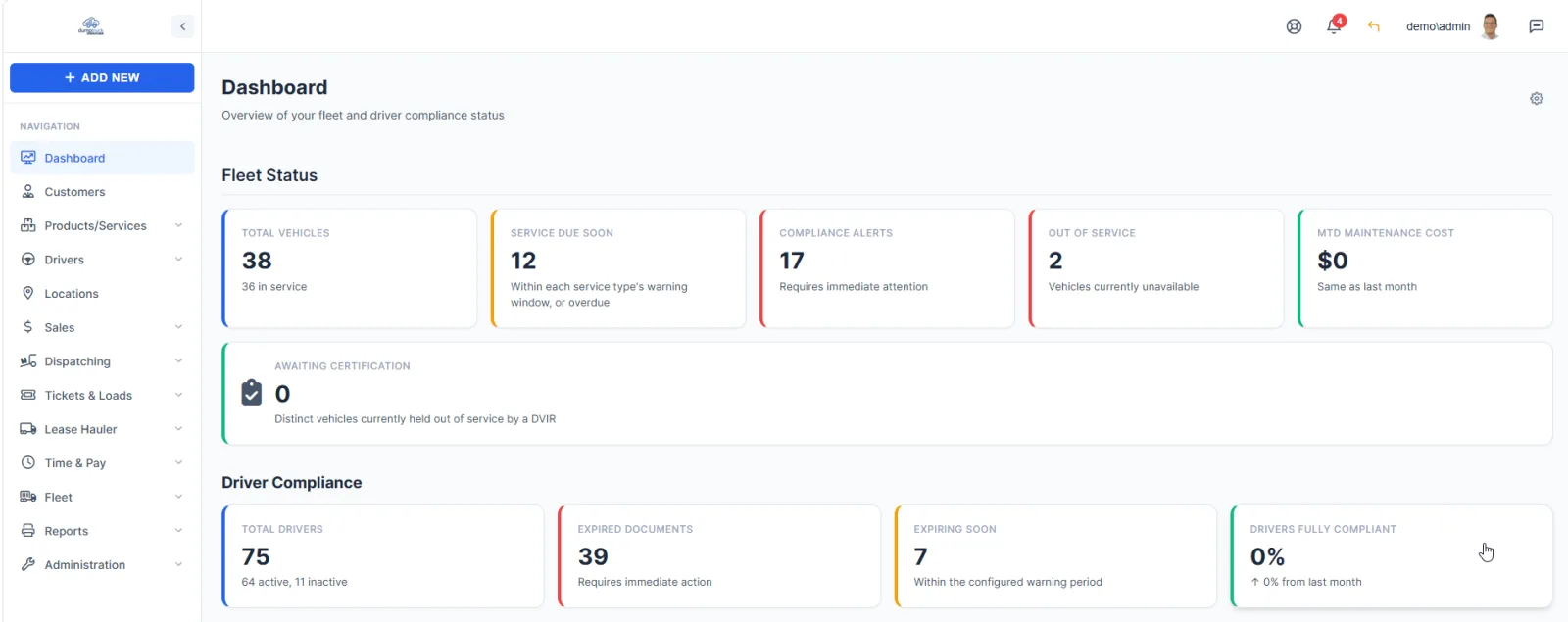
Driver files, truck records and the dispatch schedule share one database, so a compliance problem shows up where the work gets assigned.
Build each driver's DQ file
Record the employment application, prior employer inquiries, road test, medical certificate and annual MVR review. Each driver gets a DQ score, and DQ reports cover the whole roster.
Watch license, medical card and MVR dates
The driver compliance dashboard counts expired documents and the ones expiring soon, so renewals get handled before a driver is grounded.
Keep drug and alcohol records with the file
Drug and alcohol program records and Clearinghouse queries are tracked beside the DQ file instead of in a separate binder.
Keep every truck legal
Registration, annual DOT inspection and service status are tracked for each truck, and trucks held out of service show on the schedule.
Truck maintenanceCompliance is checked as you dispatch
Assign a driver or truck that is out of compliance and Bulk Haul Software warns you, or prevents the dispatch, before it goes out.
DispatchingHold subcontractors to the same standard
Subcontractors with no insurance, or that miss your other requirements, can trigger the same warning or be prevented from being dispatched.
Subcontractor management
Driver compliance
See Which Drivers Are Cleared to Haul
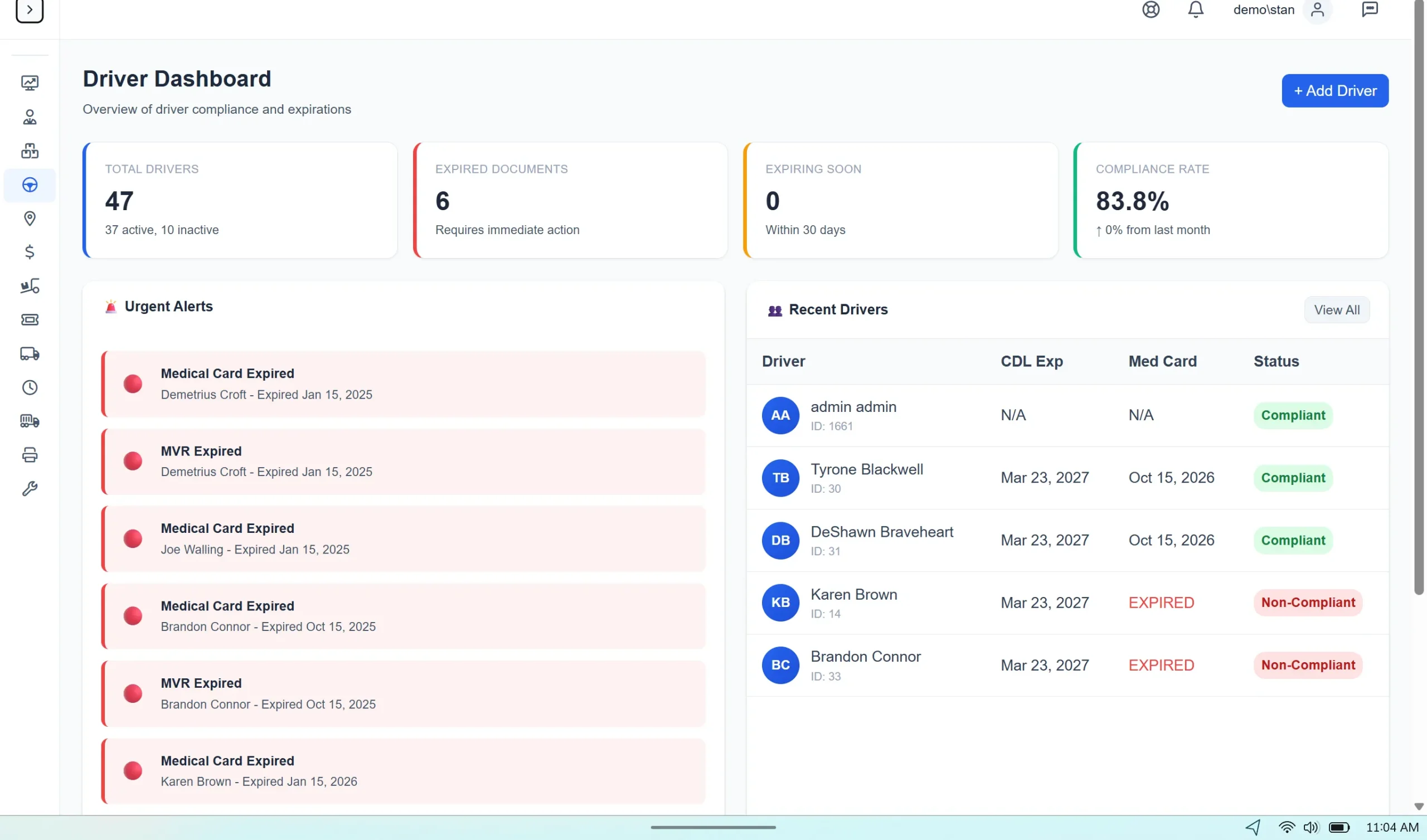
A hauling company can't wait for an audit to learn that a medical card lapsed in March. The driver dashboard puts expired and expiring documents in front of the office every day.
- Total drivers, expired documents and documents expiring soon at a glance
- Urgent alerts name the driver and the expired document
- CDL and medical card expiration dates beside each driver's status
- DQ files, MVR reviews and drug and alcohol records in the same Drivers menu
Driver Qualification File Checklist
FMCSA requires a motor carrier to keep a qualification file for every driver of a commercial motor vehicle. Here is what goes in one, and how Bulk Haul Software keeps track of it.
What goes in the DQ file (49 CFR 391.51)
- The driver's completed employment application
- A motor vehicle record from each state that licensed the driver in the past three years, pulled at hire
- A road test certificate, or the license or certificate you accepted as its equivalent
- A motor vehicle record from each licensing state at least once a year, with a note of your annual review
- The medical examiner's certificate, or for CDL holders the state driving record showing medical certification status, plus any medical variance
Records that go with it
- Safety performance history inquiries to previous employers, kept in the driver investigation history file (49 CFR 391.53)
- Clearinghouse queries for CDL drivers: a full query before hire and at least one query a year (49 CFR 382.701)
How Bulk Haul Software tracks it
- Employment application, prior employer inquiries, road test, medical certificate and annual MVR review tracked for each driver
- A DQ score for each driver, and DQ reports for the whole roster
- MVR reviews, the drug and alcohol program and Clearinghouse queries tracked in the same place
- Expired and expiring documents counted on the driver compliance dashboard
Because the files live in your dispatch system, the dispatcher can be warned, or stopped, before assigning a driver whose DQ file is out of date.
Read the full DOT compliance checklistThis is a general summary, not legal advice. Some drivers and carriers are covered by exceptions, and the rules change, so confirm current requirements with FMCSA and 49 CFR 391.51.
Fleet compliance
Truck Inspections and Registrations Next to the Schedule
An expired plate or a missed annual inspection can turn a routine roadside inspection into a violation. Fleet compliance is tracked in the same place you assign trucks to jobs.
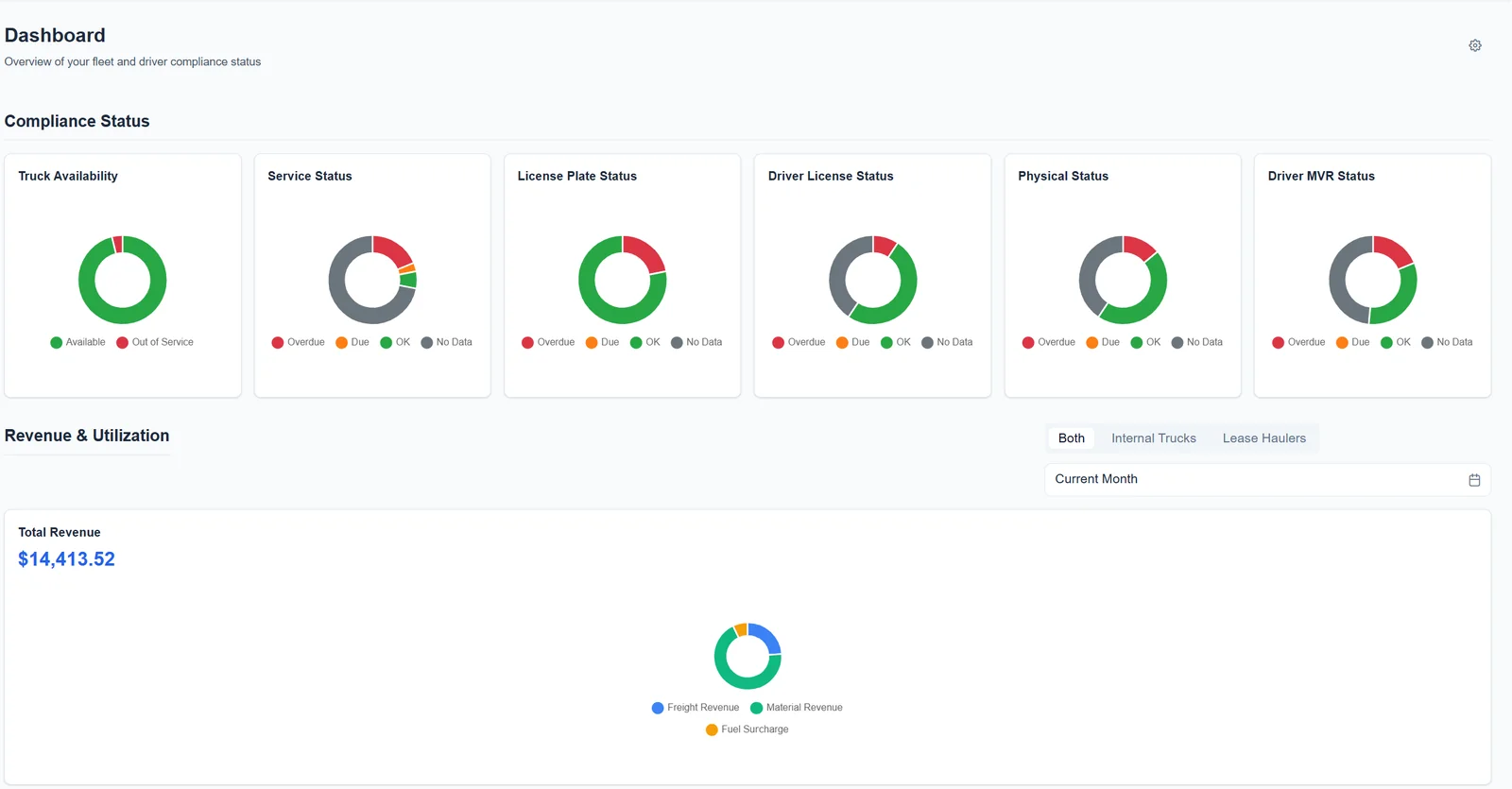
- Registration, annual DOT inspection and service status for every truck
- Overdue, due and OK status shown in color for trucks and drivers
- Trucks held out of service appear on the dispatch schedule
- Severe defects reported on a DVIR take the truck out of service
DOT Compliance for Every Kind of Bulk Hauling
Aggregate, agriculture, logging, liquids or any other load: the same driver files and truck checks sit beside your dispatch schedule.
Frequently Asked Questions
It's the record FMCSA requires a motor carrier to keep for each commercial motor vehicle driver. It includes the employment application, motor vehicle records from hire and from each annual review, a road test certificate or its equivalent, and the medical examiner's certificate. This is a general summary, so confirm current requirements with FMCSA.
Yes, and it's part of the same system you dispatch from. DQ file tracking covers the application, prior employer inquiries, road test, medical certificate and annual MVR review, with a DQ score for each driver and DQ reports. MVR reviews, the drug and alcohol program and Clearinghouse queries are tracked there too.
Yes. Driver license, medical card, MVR and DQ file status are checked where you dispatch, and the system can warn you or prevent the dispatch. Trucks are checked the same way for registration, annual DOT inspection and service status.
Yes. Fleet compliance covers each truck's registration, annual DOT inspection and service status. Preventive maintenance, work orders and DVIRs are in the same system, and a severe defect a driver reports on a DVIR takes the truck out of service.
Yes. Subcontractors keep their own truck, driver and compliance details up to date in their portal, and a subcontractor with no insurance, or that doesn't meet your other requirements, can be flagged with a warning or prevented from being dispatched.
Bulk Haul Software is the next generation of Dump Truck Dispatcher and has all of its compliance functionality and more. Full DOT driver and fleet compliance, including DQ files, the drug and alcohol program and Clearinghouse query tracking, is one of the new features.