Aggregate hauling
Aggregate Hauling Software for Pits, Quarries and Job Sites
Assign the right truck to each quarry job in seconds, capture every scale ticket in tons, and invoice a week of loads in one batch. Bulk Haul Software is aggregate trucking software that keeps your trucks moving between the pit and the job site.

Scheduling and dispatch
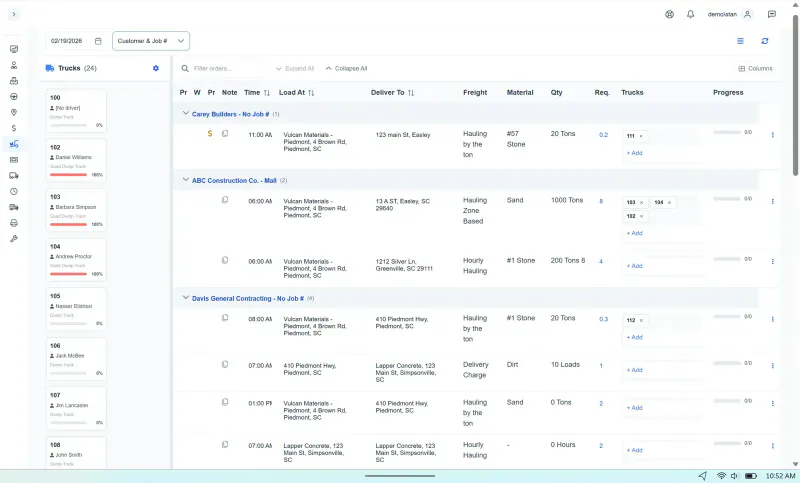
Aggregate Dispatch From the Pit to the Job Site
Trucks parked at the quarry waiting on an assignment, or double-booked to two jobs, cost you loads. Every aggregate order and every truck sits on one schedule, so a last-minute change at the pit doesn't mean calling every driver.
- Each order lists the material, the pit, the delivery point and the tons
- Run until stopped keeps loads coming until the foreman calls it
- Shift a group of trucks to another job when a pit closes or a site runs long
- Lease haulers booked on the board beside your trucks

Tickets
Every Scale Ticket Captured in Tons
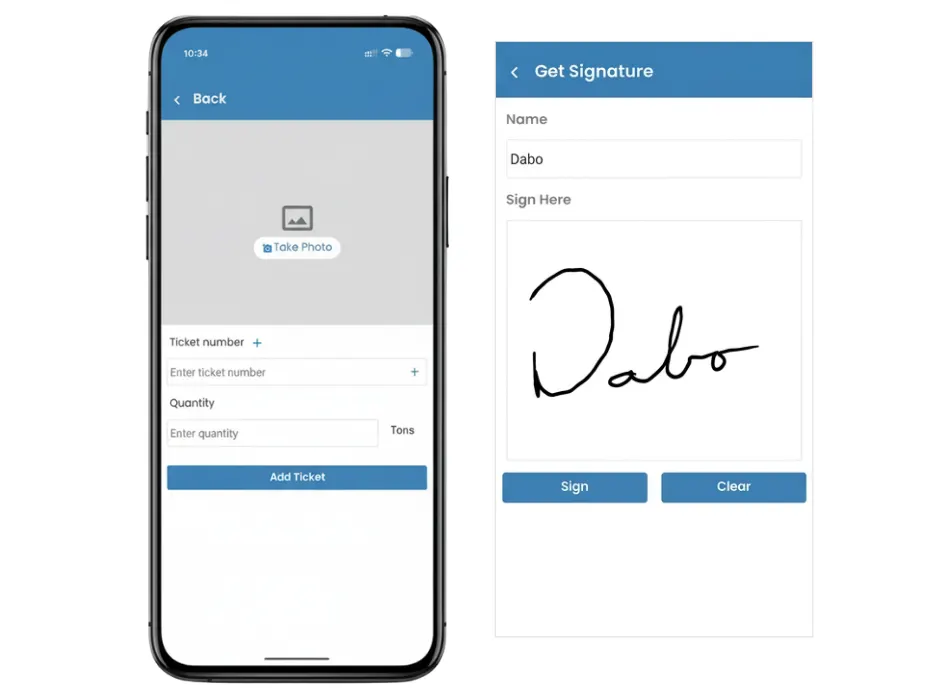
A lost paper scale ticket is a load you don't get paid for, or an argument at the end of the week. Drivers enter every ticket in the app, so the office sees the tonnage before the truck returns to the pit.
- AI reads the ticket number and tonnage off the driver's photo
- Matching scale tickets get marked Verified on their own
- Missing or doubled-up scale tickets get flagged before you bill
- The customer signs for the load at the job site
Invoicing
Invoice a Week of Loads in One Batch
Daily quarry hauling piles up paperwork fast. Verified scale tickets turn into invoices for all your customers in a single run, with fuel surcharges calculated for you.
- Every customer invoiced in a single run
- Fuel surcharge figured automatically, per line or as one total
- Contractors download their own invoices and scale tickets from the portal
- Export to QuickBooks or another accounting program on Pro

Maintenance
Keep Quarry Trucks Road-Ready
Quarry work is hard on trucks, and one breakdown can stall a whole job. Maintenance runs in the same program as dispatch, so the dispatcher can see which trucks are due for service or already down.
- PM reminders and each truck's service history
- Defects from drivers' DVIRs land with maintenance
- A downed truck shows on the schedule before you assign it
- DOT compliance for the driver and truck checked at dispatch

Software for Every Kind of Bulk Hauling
Quarry and pit hauling is only one of the jobs these dispatch, ticket and billing tools handle.
Frequently Asked Questions
Yes. Bulk Haul Software started in 2013 as dispatch software for a hauling company in Upstate South Carolina. Aggregate trucking companies quote pit and quarry jobs in it, book their trucks, capture scale tickets in tons, invoice customers and pay drivers.
Quotes, orders, the schedule, dispatches, scale tickets and invoices all sit in one program. The pit, the office and the job site work from the same records instead of phone calls and paper slips, so trucks spend more of the day hauling and less of it waiting.
Yes. Every order carries its own pit or quarry and its own delivery point, and the dispatcher sees all of them on one schedule, so trucks spread across several pits and job sites stay on one screen.
Turn on "Run until stopped" for that order. Each time a driver finishes a load, the next dispatch is created automatically, and it keeps going until the dispatcher or driver closes it out.
Put lease hauler trucks on your schedule next to your own. Each subcontractor keeps its trucks and drivers up to date in its own portal, and their loads and scale tickets show up in your system without anyone retyping them.
No. A driver gets each dispatch on their phone, taps to acknowledge it, and adds the scale ticket in a few steps. A short walkthrough is usually all it takes.
Scale tickets are verified, then invoiced in batches, so hundreds of loads turn into invoices in seconds. Print or email them, or let customers pull up invoices and tickets themselves in the customer portal.