Release 2.9.21.21
This release continues our recent efforts to boost application performance by shifting the generation of reports, imports, and exports to a separate server. Most processes have now been streamlined, with…

Most of our effort over the past month has been determining the causes of the intermittent extended delays and correcting them. One of the main issues was the generation of large reports. To fix this, we are moving the processing of reports, imports, and exports to a separate server. We are also working on optimizing some slow queries that we have identified as causing some of the delays.
Reports are anything being generated that are designed for a print layout. That includes PDF versions of invoices, receipts, orders, etc.. We had to modify the process slightly to move report generation to a separate server, ensuring it doesn’t impact real-time functionality.
Now, when you run most reports, you’ll typically see a notification that your report is being generated. It looks like the blue notification shown below. When the report is complete, you’ll see a green notification confirming its completion. If you click the green notification, the PDF file will be downloaded.
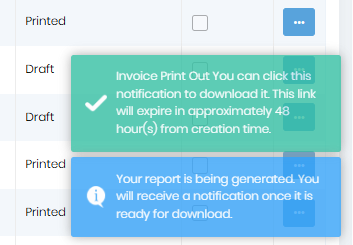
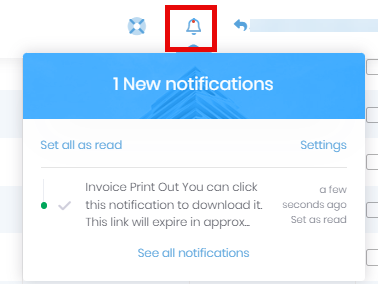
If you don’t click the green notification while it is available, you can click the bell icon at the top of the screen to get to your notifications and download it from there. You don’t need to print it again. The downloads will be available for 48 hours. Clicking “See all notifications” will show notifications beyond the last three.
The reports will typically take between a few seconds for short reports to a minute or 2 for longer reports. If you have waited longer than that, there is another issue. See this document for troubleshooting the report not being generated. If that doesn’t fix the issue let us know and we’ll check your setup and permissions.