Release 2.9.30.36
The major changes were to the "Ticket List" and vehicle work order, and customer terms.

This release continues our recent efforts to boost application performance by shifting the generation of reports, imports, and exports to a separate server. Most processes have now been streamlined, with only a few remaining for future improvement.
Converted most reports, imports, and exports to run as background tasks on a separate server.
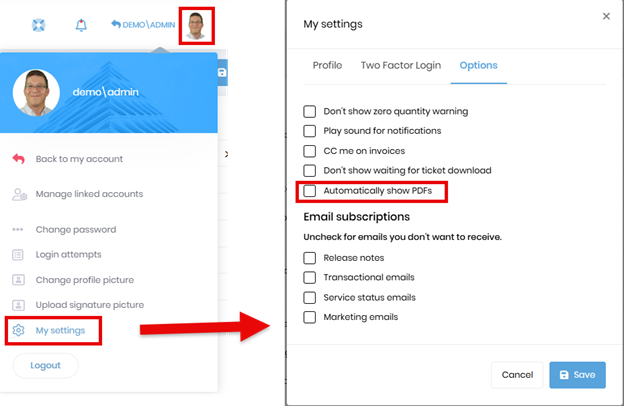
On the previous release, all export and PDF files showed as downloads in your browser and you selected whether to open the file or save as. We added a user setting to “Automatically show PDFs” in a new tab. You will want to check this option if you usually want to view the PDF immediately. If you are typically just downloading files without previewing them, you won’t want to check this checkbox.
Provided a means for configuring which items you want displayed in the detail of your invoices. Prior to this release, we included most of the options. You now can control what displays. If you don’t want all the items shown in the template to display in the invoice detail you can either remove the token, or submit a support request and we’ll take care of it for you. Below is an example of the template shown on the Invoice tab of Settings.

Added a check for disabled notifications. Many users had disabled their notifications and were unable to print reports. To prevent this, we added a check to see if your notifications are disabled on printing a report. If they are, we offer to turn them back on so you can get the report. If you don’t allow the notifications to be enabled, you will not be able to get the reports.
Fixed an issue with multi-office tenants where orders weren’t printing line items for offices other than their default office.
The functionality to “Include drive time” was changed so that the allowed drive time is added for hourly jobs even if the material is being billed and is a different unit of measure.
Fixed an issue with invoices not being set to the correct status when “Print/Email Invoices” process runs.
Added a notification to alert dispatchers when scheduling a Lease Hauler with expired insurance.
Fixed a bug where the ‘Run until stopped’ option for dispatch could not be unchecked after the dispatch has been acknowledged. You can now uncheck it if the dispatch is acknowledged, but not yet loaded.