Release 2.9.21.21
This release continues our recent efforts to boost application performance by shifting the generation of reports, imports, and exports to a separate server. Most processes have now been streamlined, with…

We continued to work on performance on this release and added a few small feature requests.
Added Truck Code to the Pay Statement export file.
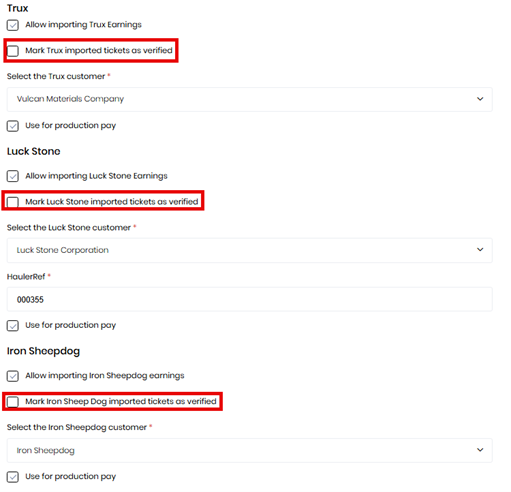
This only applies to those tenants with the feature to import Trux, Luck Stone, or Iron Sheep Dog tickets enabled. The imports each used to have a separate settings tab. They now are displayed on the “Integrations” settings tab as shown below.
We added the ability to automatically set the imported tickets to “Verified” on the import so you won’t have to manually verify them. You can configure the import settings on the “Integrations” settings tab. If you aren’t seeing any of the options, contact support via a support form and we can enable the import functionality features.
Changed the import files to be selected directly from the “Import” menu button instead of separate button or a dialog where you select the type of import.
Fixed the overall percentage of deliveries on the Lease Hauler Delivery Performance Report.
Improved the spacing on the grouped invoices. Large totals didn’t have adequate spacing.
Corrected the issue where some drivers that had time entered via the “Time Entry” view were not getting included in the “Driver Pay Statement.”
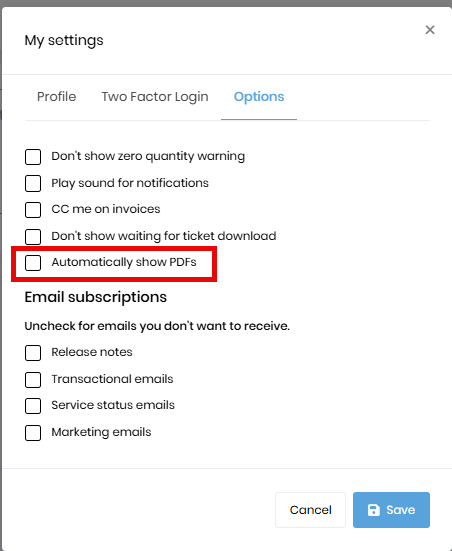
With some prior changes, the PDFs were being downloaded when you clicked the link to see the report. Several people requested that we change it back to automatically show the PDFs instead of downloading them upon clicking the link. We added an “Automatically show PDFs” user setting, which you can access from your user profile. Click the checkbox to display the PDF automatically. If you normally download documents, you probably want to leave it as it is.
It was brought to our attention that some people prefer using the “Ticket List” to verify tickets instead of the “Tickets by Driver.” For large companies, the “Tickets by Driver” view takes a while to load because of all the data being loaded into memory at once. Since the “Ticket List” allows more filtering and doesn’t load all data at once, some were using this screen, but needed it to be improved to support all their needs.
While we already allowed verifying tickets by clicking on the “Ver” checkbox for the appropriate ticket, this column wasn’t always displayed on small screens. We moved this column to the left so it will always be available.
Some functionality is missing from the “Ticket List” for it to fully replace the “Tickets by Driver”.
First, the “Tickets by Driver” bulk updates certain job-related values across all tickets on a job when one is changed. This can be done today by editing the job associated with the ticket.
In the next release, we’ll allow you to open the job directly from the “Ticket List” so you can edit it without a search. We’ll also need to provide a way to change the fuel cost. For now, if you use the “Ticket List” to verify your tickets, you will still need to set the fuel cost on the “Tickets by Driver.”
If you have a large fleet and don’t want to wait for the long load time for the “Tickets by Driver” screen, you might consider verifying via the “Ticket List.”