Release 2.9.21.21
This release continues our recent efforts to boost application performance by shifting the generation of reports, imports, and exports to a separate server. Most processes have now been streamlined, with…

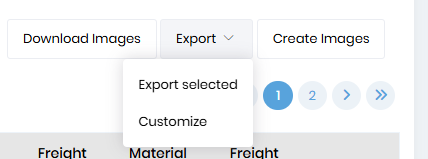
The export button was moved from the top of the screen to just above the top of the datatable. The available options will be displayed upon selecting the tickets that you want an action to be done for.
The additional “Create Image” option allows you to create an image for tickets that you have not uploaded a picture and want one to be created. You might use this to print a time ticket if one was not created via the driver app. Or, if you do material sales, you can create tickets this way instead of using counter sales.
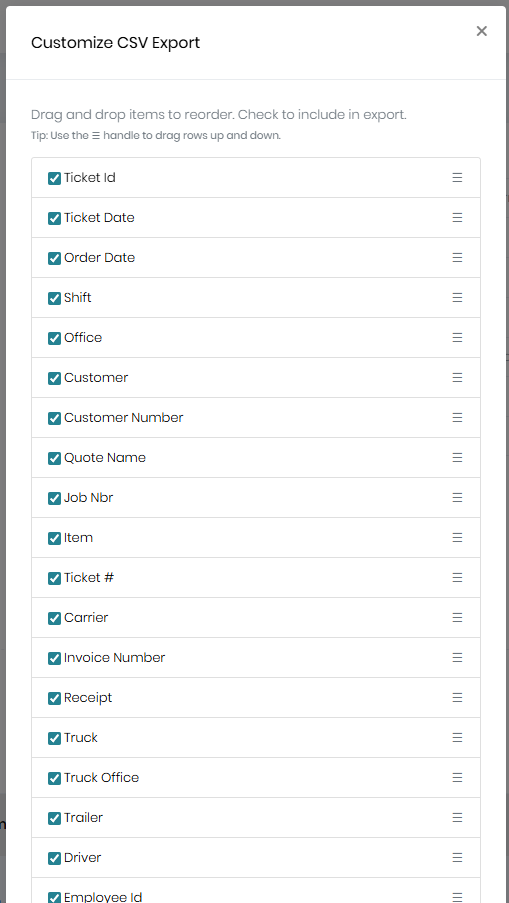
You can also choose the columns you want exported and the order in which they are exported.
If you click on the “Export” button, you’ll have an option to “Customize”. Select this and choose the desired columns and order.
Increased the size of the notes.
Removed the following from being required.
Previously, material only orders didn’t permit specifying a “load at” location. The “Load at” control should now be available on quotes, orders, and jobs. This will allow default prices to be set based on material and location for those with different pricing per location.
We added numerous customer terms, including “COD” and “Prepaid” terms. With the addition of the terms, we removed the “COD” checkbox since it is redundant. Instead, you should select the “COD” term. In the case of customers with “Prepaid” terms.