
Tax calculations on orders, back-office reports are calculated based on the “tax calculation type” that you select in the “invoice” tab on the settings page. Please refer to the Invoice section on how to select the tax calculation type.
Suppose you have added the following line items (as shown in the image below) on the order and you entered the sales tax rate as 3.5 on the order.
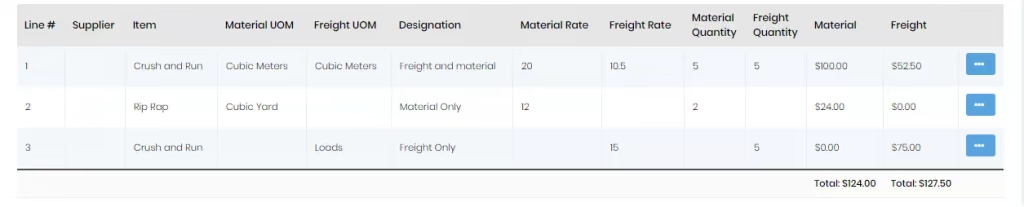
In this case,
Material total = 124, Freight total = 127.50
Sales tax rate =3.5
So tax will be calculated as,
The same value is shown in the sales tax field but up to 2 decimal places only (after rounding off the final sales tax value). Then the total is calculated using this sales tax, and the total of material and freight.
When you print the back-office report of the order, the same calculation technique as explained above is used for calculating the sales tax value.
Suppose you have added the following line items (as shown in the image below) on the order and you entered the sales tax rate as 3.5 on the order,.
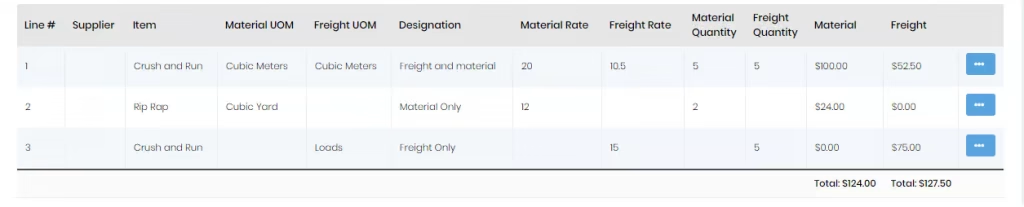
In this case, only lines 1 and 2 have materials on the line so only these 2 will be considered for calculation of tax. Line 3 does not have the material and is freight only so it will not be considered.
Sales tax rate =3.5 So tax will be calculated as,
The same value is shown in the sales tax field but up to two decimal places only (after rounding off the final sales tax value). Then the total is calculated using this sales tax and the total of material and freight.

When you print the back-office report of the order, the same calculation technique as explained above is used for calculating the sales tax value.
Suppose you have added the following line items (as shown in the image below) on the order and you entered the sales tax rate as 3.5 on the order.
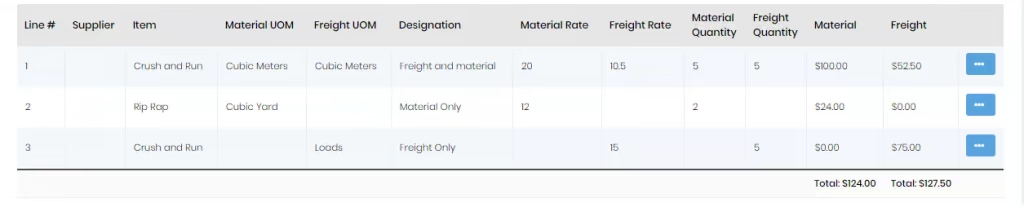
In this case, the total material charges of all line items are considered for the calculation of tax.
Material total of all line items = 124
Sales tax rate =3.5
So tax will be calculated as,
The same value is shown in the sales tax field but up to 2 decimal places only (after rounding off the final sales tax value). Then the total is calculated using this sales tax and the total of material and freight.

When you print the back-office report of the order, the same calculation technique as explained above is used for calculating the sales tax value.
Suppose you have added the following line items (as shown in the image below) on the order.
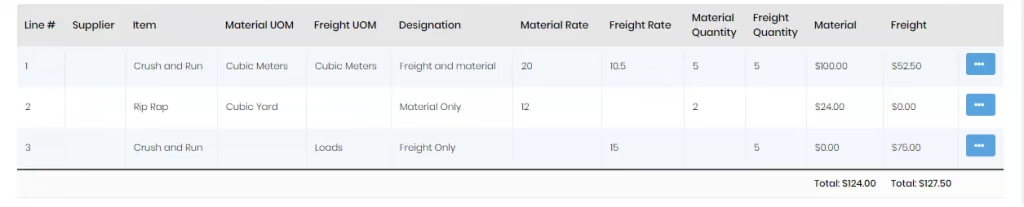
In this case, you will not be allowed to enter the sales tax rate, but you can directly add the sales tax (e.g. 200) to the order. When this tax calculation type is selected, the sales tax rate field is disabled.
When you print the back-office report of the order, the same sales tax value which was entered on the order page is used for calculating the total value.
